NeoAccess library - Tutorial : Importing data into Neo4j from a Pandas data frame,
using the load_pandas() method
Overview and Intro article
Reference guide
CAUTION: running this tutorial will clear out the database
In [1]:
import os
import sys
import getpass
import pandas as pd

from neoaccess import NeoAccess
# In case of problems, try a sys.path.append(directory) , where directory is your project's root directory
1. Connecting to the database
You can use a free local install of the Neo4j database, or a remote one on a virtual machine under your control, or a hosted solution
NOTE: This tutorial is tested on version 4.4 of the Neo4j database, but will probably also work on the new version 5 (NOT guaranteed, however...)
In [2]:
# Save your credentials here - or use the prompts given by the next cell
host = ""               # EXAMPLES:  bolt://123.456.789.012   OR   neo4j://localhost
                        # (CAUTION: do NOT include the port number!)
password = ""
In [3]:
db = NeoAccess(host=host,
               credentials=("neo4j", password))
Connection to Neo4j database established.
In [4]:
print("Version of the Neo4j driver: ", db.version())
Version of the Neo4j driver: 4.4.11
In [ ]:
In [ ]:
2. Importing data into an empty database from a Pandas dataframe
In the following example, the database entities are EMPLOYEES at a company
In [5]:
# CLEAR OUT THE DATABASE
#db.empty_dbase()       # UNCOMMENT IF DESIRED   *****************  WARNING: USE WITH CAUTION!!!  ************************
In [6]:
# Prepare a Pandas data frame with the data.  (In some use cases, the data frame would be read in from a CSV file)

df = pd.DataFrame({"employee ID": [100, 200, 300],
                   "active": [True, True, True],
                   "name": ["John Doe", "Valerie Leben", "Jill Smith"],
                   "job title": ["administrative assistant", "CEO", "head of marketing"],
                   "salary": [80000, 400000, 250000]
                  })

df
Out[6]:
| employee ID | active | name | job title | salary | |
|---|---|---|---|---|---|
| 0 | 100 | True | John Doe | administrative assistant | 80000 |
| 1 | 200 | True | Valerie Leben | CEO | 400000 |
| 2 | 300 | True | Jill Smith | head of marketing | 250000 |
In [7]:
# Always a good idea to make sure that the data types are what we need them to be,
# especially if your dataframe originated from a CSV file.
# Note: it's normal for strings show up as "object" in a Pandas dataframe (because of their variable length)

df.dtypes
Out[7]:
employee ID     int64
active           bool
name           object
job title      object
salary          int64
dtype: object
In [8]:
# Now import the data into the database.
# We'll use the label "Employee".  Note: blanks are allowed, and so are multiple labels (use a list or tuple)

internal_ids = db.load_pandas(df, labels="Employee")

internal_ids  # This is a list of the Neo4j ID's assigned to the new nodes
Out[8]:
[43302, 43303, 43304]
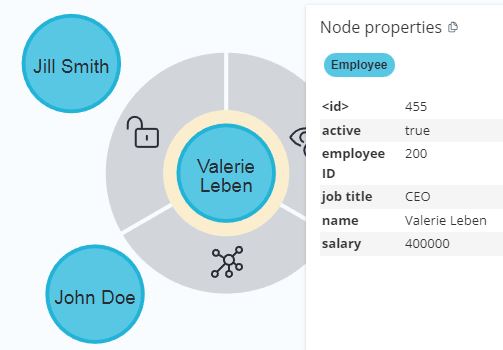
Voila', as simple as that! Here's what the database looks like at this stage:
Now, retrieve the newly-created nodes
In [9]:
match_specs = db.match(labels="Employee")   # Our specifications to later locate nodes by (here, by using labels)
                                            # NO DATABASE OPERATION PERFORMED HERE

print(match_specs)
RAW match structure (object of class NodeSpecs):
    internal_id: None    labels: Employee    key_name: None    key_value: None    properties: None    clause: None    clause_dummy_name: None
In [10]:
db.get_nodes(match_specs)
Out[10]:
[{'employee ID': 100,
  'name': 'John Doe',
  'active': True,
  'salary': 80000,
  'job title': 'administrative assistant'},
 {'employee ID': 200,
  'name': 'Valerie Leben',
  'active': True,
  'salary': 400000,
  'job title': 'CEO'},
 {'employee ID': 300,
  'name': 'Jill Smith',
  'active': True,
  'salary': 250000,
  'job title': 'head of marketing'}]
Side note - If APOC is installed in the database, we can verify that the data types got correctly imported by issuing the following Cyher command:
In [11]:
q = '''MATCH (n :Employee)
       RETURN apoc.meta.cypher.types(n)
       LIMIT 1
    '''

db.query(q)   # Run the Cypher query
Out[11]:
[{'apoc.meta.cypher.types(n)': {'employee ID': 'INTEGER',
   'name': 'STRING',
   'active': 'BOOLEAN',
   'salary': 'INTEGER',
   'job title': 'STRING'}}]
In [ ]:
In [ ]:
3. Adding data to an existing database from a Pandas dataframe (keeping existing fields)
In [12]:
# Let's review our old, original data frame

df
Out[12]:
| employee ID | active | name | job title | salary | |
|---|---|---|---|---|---|
| 0 | 100 | True | John Doe | administrative assistant | 80000 |
| 1 | 200 | True | Valerie Leben | CEO | 400000 |
| 2 | 300 | True | Jill Smith | head of marketing | 250000 |
Now, consider a NEW dataframe with changes/updates
This dataframe spells out the details of Jill's raise:
In [13]:
df_update_1 = pd.DataFrame({"employee ID": [300],
                            "salary": [270000]
                            })

df_update_1
Out[13]:
| employee ID | salary | |
|---|---|---|
| 0 | 300 | 270000 |
The new data can be MERGED into the existing data, by using the "employee ID" for matching against existing records
Notice the use of the argument merge_primary_key="employee ID"
In [14]:
db.load_pandas(df_update_1, labels="Employee",
               merge_primary_key="employee ID", merge_overwrite=False)  # merge_overwrite=False means updating the record rather then completely over-writing it,
                                                                        #    i.e. "KEEP EXISTING DATA IN FIELDS NOT SPECIFIED IN THE DATAFRAME"
Out[14]:
[43304]
In [15]:
db.get_nodes(match_specs) # The specs haven't changed: we still want to "locate all nodes with the "Employee" label
Out[15]:
[{'employee ID': 100,
  'name': 'John Doe',
  'active': True,
  'salary': 80000,
  'job title': 'administrative assistant'},
 {'employee ID': 200,
  'name': 'Valerie Leben',
  'active': True,
  'salary': 400000,
  'job title': 'CEO'},
 {'employee ID': 300,
  'name': 'Jill Smith',
  'active': True,
  'salary': 270000,
  'job title': 'head of marketing'}]
Notice how Jill got her raise, and her other fields were left untouched
In [ ]:
In [ ]:
4. Adding data to an existing database from a Pandas dataframe (completely over-writing records)
Let's say that John is retiring. We may want to keep the record with the employee ID and the name, but flip the "active" field to false, and DROP all other fields
This can be done by importing the following dataframe, again with merge_primary_key="employee ID" BUT this time with the merge_overwrite=True option
In [16]:
df_update_2 = pd.DataFrame({"employee ID": [100],
                            "active": [False],
                            "name": ["John Doe"]
                           })

df_update_2
Out[16]:
| employee ID | active | name | |
|---|---|---|---|
| 0 | 100 | False | John Doe |
In [17]:
db.load_pandas(df_update_2, labels="Employee",
               merge_primary_key="employee ID", merge_overwrite=True)  # merge_overwrite=True means blanking out the record and then re-building it,
                                                                       #    i.e. "DON'T KEEP EXISTING DATA IN FIELDS NOT SPECIFIED IN THE DATAFRAME"
Out[17]:
[43302]
In [18]:
db.get_nodes(match_specs) # The specs haven't changed: we still want to "locate all nodes with the "Employee" label
Out[18]:
[{'employee ID': 100, 'name': 'John Doe', 'active': False},
 {'employee ID': 200,
  'name': 'Valerie Leben',
  'active': True,
  'salary': 400000,
  'job title': 'CEO'},
 {'employee ID': 300,
  'name': 'Jill Smith',
  'active': True,
  'salary': 270000,
  'job title': 'head of marketing'}]
Notice how John's old record got ditched, and COMPLETELY REPLACED with the new data (containing fewer fields)
Nothing else got modified
In [ ]:
For more options to use with load_pandas(), please see the reference guide
In [ ]: