NeoSchema library - Tutorial 2 : set up a simple Schema (Classes, Properties)
and perform a data import (Data Nodes and relationships among them)
If you're new to Graph Databases, you can think of "Classes" and "Properties" along the lines of, respectively, "Table names" and "Table field lists".
If you need to first clear out your test database, one of the cells below (currently commented out) will conveniently let you do it
Background Article on Schema in Graph Databases
In [1]:
import os
import sys
import getpass
import pandas as pd

from neoaccess import NeoAccess
from brainannex import NeoSchema
# In case of problems, try a sys.path.append(directory) , where directory is your project's root directory
In [ ]:
Connect to the database,
using the NeoAccess library
You can use a free local install of the Neo4j database, or a remote one on a virtual machine under your control, or a hosted solution, or simply the FREE "Sandbox" : instructions here
NOTE: This tutorial is tested on version 4.4 of the Neo4j database, but will probably also work on the new version 5 (NOT guaranteed, however...)
In [2]:
# Save your credentials here - or use the prompts given by the next cell
host = ""               # EXAMPLES:  bolt://123.456.789.012   OR   neo4j://localhost
                        # (CAUTION: do NOT include the port number!)
password = ""
In [ ]:
In [3]:
db = NeoAccess(host=host,
               credentials=("neo4j", password), debug=False)   # Notice the debug option being OFF
Connection to Neo4j database established.
In [4]:
print("Version of the Neo4j driver: ", db.version())
Version of the Neo4j driver: 4.4.11
In [ ]:
Import of data from a Pandas data frame using the NeoSchema library
Initial setup
In [5]:
# CLEAR OUT THE DATABASE
#db.empty_dbase()       # UNCOMMENT IF DESIRED   *****************  WARNING: USE WITH CAUTION!!!  ************************
In [6]:
NeoSchema.set_database(db)
Create the Schema
In [8]:
# Create a "City" Class node - together with its Properties, based on the data to import

NeoSchema.create_class_with_properties(name="City", properties=["City ID", "name"])
Out[8]:
(43255, 'schema-1')
In [9]:
# Likewise for a "State" Class node - together with its Properties, based on the data to import

NeoSchema.create_class_with_properties(name="State", properties=["State ID", "name", "2-letter abbr"])
Out[9]:
(43258, 'schema-4')
In [10]:
# Now add a relationship named "IS_IN", from the "City" Class to the "State" Class

NeoSchema.create_class_relationship(from_class="City", to_class="State", rel_name="IS_IN")
In [ ]:
In [ ]:
Now import some data
We'll pass our data as Pandas data frames; those could easily be read in from CSV files, for example
In [11]:
city_df = pd.DataFrame({"City ID": [1, 2, 3, 4], "name": ["Berkeley", "Chicago", "San Francisco", "New York City"]})
city_df
Out[11]:
| City ID | name | |
|---|---|---|
| 0 | 1 | Berkeley |
| 1 | 2 | Chicago |
| 2 | 3 | San Francisco |
| 3 | 4 | New York City |
In [12]:
state_df = pd.DataFrame({"State ID": [1, 2, 3], "name": ["California", "Illinois", "New York"], "2-letter abbr": ["CA", "IL", "NY"]})
state_df
Out[12]:
| State ID | name | 2-letter abbr | |
|---|---|---|---|
| 0 | 1 | California | CA |
| 1 | 2 | Illinois | IL |
| 2 | 3 | New York | NY |
In [13]:
# In this example, we assume a separate table ("join table") with the data about the relationships;
# this would always be the case for many-to-many relationships;
# 1-to-many relationships, like we have here, could also be stored differently
state_city_links_df = pd.DataFrame({"State ID": [1, 1, 2, 3], "City ID": [1, 3, 2, 4]})
state_city_links_df
Out[13]:
| State ID | City ID | |
|---|---|---|
| 0 | 1 | 1 |
| 1 | 1 | 3 |
| 2 | 2 | 2 |
| 3 | 3 | 4 |
In [ ]:
Ingesting the Data Frames into the graph database is quite easy:
In [14]:
NeoSchema.import_pandas_nodes(df=city_df, class_node="City")
import_pandas_nodes(): getting ready to import 4 records...
    FINISHED importing a total of 4 records
Out[14]:
[43262, 43263, 43264, 43265]
In [15]:
NeoSchema.import_pandas_nodes(df=state_df, class_node="State")
import_pandas_nodes(): getting ready to import 3 records...
    FINISHED importing a total of 3 records
Out[15]:
[43266, 43267, 43268]
In [16]:
NeoSchema.import_pandas_links(df=state_city_links_df,
                              col_from="City ID", col_to="State ID",
                              link_name="IS_IN")
Getting ready to import 4 links...
    FINISHED importing a total of 4 links
Out[16]:
[36539, 36540, 36541, 36542]
In [ ]:
This is what we have created with our import:
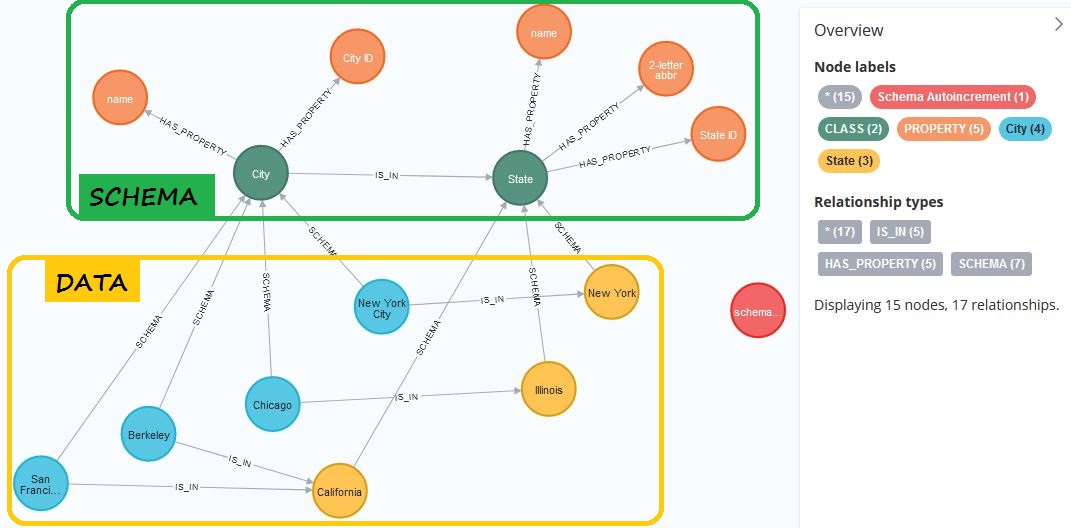
Notice that the data from that "join table" (with "State ID" and "City ID") that was used for the import, to link up states and cities, is now stored as RELATIONSHIPS - nativety represented in the graph database
In [ ]: