NeoSchema library - Tutorial 1 : basic Schema operations (Classes, Properties, Data Nodes)
This is a Schema-layer version of the tutorial tutorial_neoaccess_1
Note: if you need to clear out your test database, one of the cells below (currently commented out) will conveniently let you do it
Article to accompany this tutorial
In [1]:
import os
import sys
import getpass

from neoaccess import NeoAccess
from brainannex import NeoSchema
# In case of problems, try a sys.path.append(directory) , where directory is your project's root directory
In [ ]:
Connect to the database
using the NeoAccess library
You can use a free local install of the Neo4j database, or a remote one on a virtual machine under your control, or a hosted solution, or simply the FREE "Sandbox" : instructions here
NOTE: This tutorial is tested on version 4.4 of the Neo4j database, but will probably also work on the new version 5 (NOT guaranteed, however...)
In [2]:
# Save your credentials here - or use the prompts given by the next cell
host = ""               # EXAMPLES:  bolt://123.456.789.012   OR   neo4j://localhost
                        # (CAUTION: do NOT include the port number!)
password = ""
In [ ]:
In [3]:
db = NeoAccess(host=host,
               credentials=("neo4j", password), debug=False)   # Notice the debug option being OFF
Connection to Neo4j database established.
In [4]:
print("Version of the Neo4j driver: ", db.version())
Version of the Neo4j driver: 4.4.11
In [ ]:
Examples of basic NeoSchema library operations
Initial setup
In [5]:
# CLEAR OUT THE DATABASE
#db.empty_dbase()       # UNCOMMENT IF DESIRED   *****************  WARNING: USE WITH CAUTION!!!  ************************
In [6]:
NeoSchema.set_database(db)
Create the Schema
In [7]:
# Create a "Car" Class node.  Class nodes are part of the Schema

car_class_id, car_class_uri = NeoSchema.create_class(name="Car")
In [8]:
# Declare various Properties (data fields) for the "Car" Class

NeoSchema.add_properties_to_class(class_node = car_class_id, property_list = ['color', 'make'])
Out[8]:
2
In [10]:
# Do a similar construction for a "Person" Class node - but this time do it all in just 1 step

NeoSchema.create_class_with_properties(name="Person", properties=["name"])
Out[10]:
(43250, 'schema-4')
In [11]:
# Now add a relationship named "OWNED_BY", from the "Car" Class to the "Person" Class

NeoSchema.create_class_relationship(from_class="Car", to_class="Person", rel_name="OWNED_BY")
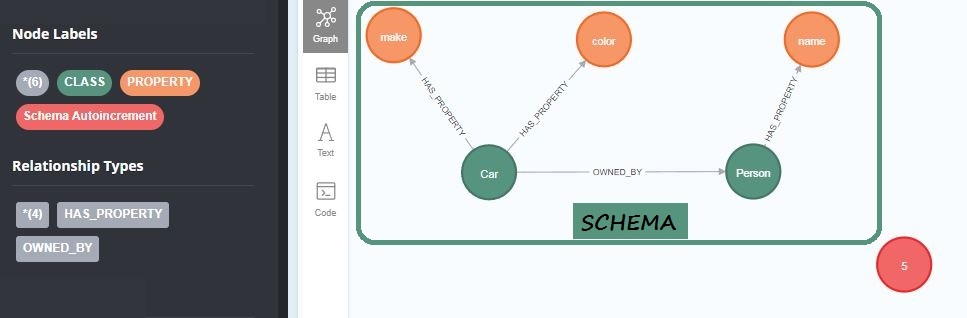
This is what we have so far:
Adding the data
In [12]:
# Having set up the Schema, time for some actual data!  Add a Data Node for a "Car", and one for a "Person"
# Note that create_data_node() returns the internal database ID of the new node

car_id = NeoSchema.create_data_node(class_node="Car", properties={'color': 'white', 'make': 'Toyota'})

person_id = NeoSchema.create_data_node(class_node="Person", properties={'name': 'Julian'})
In [13]:
# Finally, add a relationship named "OWNED_BY", from the "Car" DATA node to the "Person" DATA node (as sanctioned in the Schema declared earlier)

NeoSchema.add_data_relationship(from_id=car_id, to_id=person_id, rel_name="OWNED_BY")
We'll keep it simple in this tutorial! Data validation, URI's, etc, will be explored in later tutorials...
In [ ]: