NeoAccess library - Tutorial 1 : connection to the Neo4j database,
and basic NeoAccess library operations (incl. "NodeSpecs" objects)
(debug mode OFF)
Overview and Intro article to accompany these tutorials
CAUTION: running this tutorial runs a risk of clearing out your database; best run on a test database!
In [2]:
import os
import sys
import getpass

from neoaccess import NeoAccess
# In case of problems, try a sys.path.append(directory) , where directory is your project's root directory
Connect to the database
You can use a free local install of the Neo4j database, or a remote one on a virtual machine under your control, or a hosted solution, or simply the FREE "Sandbox" : instructions here
NOTE: This tutorial is tested on version 4.4 of the Neo4j database, but will probably also work on the new version 5 (NOT guaranteed, however...)
In [3]:
# Save your credentials here - or use the prompts given by the next cell
host = ""               # EXAMPLES:  bolt://123.456.789.012   OR   neo4j://localhost
                        # (CAUTION: do NOT include the port number!)
password = ""
In [4]:
db = NeoAccess(host=host,
               credentials=("neo4j", password), debug=False)   # Notice the debug option being OFF
Connection to Neo4j database established.
In [5]:
print("Version of the Neo4j driver: ", db.version())
Version of the Neo4j driver: 4.4.11
Examples of basic NeoAccess library operations
In [6]:
# CLEAR OUT THE DATABASE
#db.empty_dbase()       # UNCOMMENT IF DESIRED   *****************  WARNING: USE WITH CAUTION!!!  ************************
In [7]:
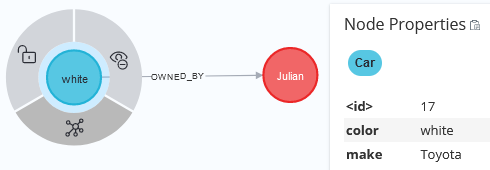
# Create a "Car" node and a "Person" node

neo_car = db.create_node("Car", {'color': 'white', 'make': 'Toyota'})  # create_node returns the internal database ID of the new node

neo_person = db.create_node("Person", {'name': 'Julian'})
In [8]:
# Link the "Car" node to the "Person" node (using internal database ID's to refer to existing nodes)
number_added = db.add_links(match_from=neo_car, match_to=neo_person, rel_name="OWNED_BY")

number_added
Out[8]:
1
In [9]:
# Retrieve the car node (in the most straightforward way, using an internal database ID)
db.get_nodes(neo_car)
Out[9]:
[{'color': 'white', 'make': 'Toyota'}]
In [10]:
# Retrieve a single property of the car node (to be used when only 1 node is present)
db.get_nodes(neo_car, single_cell="color")
Out[10]:
'white'
In [11]:
# How many owners does the car have?
db.count_links(neo_car, rel_name="OWNED_BY", rel_dir="OUT")
Out[11]:
1
In [12]:
# Look up information about the car owner(s)
db.follow_links(neo_car, rel_name="OWNED_BY", rel_dir="OUT")
Out[12]:
[{'name': 'Julian'}]
In [ ]:
Let's pretend we didn't save the internal database ID's of our 2 nodes; let's specify those nodes, for the purpose of LATER retrieving them from the database
In [13]:
# Lets provide a way to later look up the "Car" node, using the match() method.
# IMPORTANT: NO DATABASE OPERATION IS ACTUALLY PERFORMED HERE!  We're just saving up all the specs
#            (to indentify a node, OR GROUP OF NODES) into an object of class "NodeSpecs"

car_match = db.match(labels="Car", properties={'color': 'white', 'make': 'Toyota'})

car_match
Out[13]:
<neoaccess.cypher_utils.NodeSpecs at 0x1a0dd790>
In [14]:
print(car_match) # Let's look at the specs we saved up; they will be used LATER in actual database operations
RAW match structure (object of class NodeSpecs):
    internal_id: None    labels: Car    key_name: None    key_value: None    properties: {'color': 'white', 'make': 'Toyota'}    clause: None    clause_dummy_name: None
In [15]:
# A lot of parameters can be passed to match().  Some examples of alternative ways to specify the same node as above:

car_match_alt = db.match(labels="Car", clause="n.color = 'white' AND n.make = 'Toyota'", dummy_node_name="n")

print(car_match_alt)
RAW match structure (object of class NodeSpecs):
    internal_id: None    labels: Car    key_name: None    key_value: None    properties: None    clause: n.color = 'white' AND n.make = 'Toyota'    clause_dummy_name: n
In [ ]:
In [16]:
# Various ways to specify our Person node (again, NO DATABASE OPERATION IS ACTUALLY PERFORMED HERE!)

person_match  = db.match(labels="Person", properties={'name': 'Julian'})
person_match_alt_1 = db.match(labels="Person", clause="n.name = 'Julian'", dummy_node_name="n")
person_match_alt_2 = db.match(labels="Person", key_name='name', key_value='Julian')
Armed with the "NodeSpecs" objects, we can do all sort of operations - passing those objects (serving as "handles") in lieu of the internal database ID's that we lack (and which would require extra database operations to retrieve)
Note: NO EXTRA DATABASE OPERATIONS ARE WASTED ON LOCATING THE NODES! Efficient, 1-step, database queries are created and executed at the very LAST stage; for example to create the following link
In [17]:
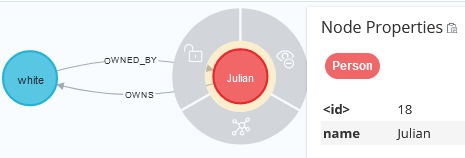
# Link the "Person" node to the "Car" node (a reverse link of the one we created before)
# HERE'S WHERE THE (SINGLE) DATABASE OPERATION ACTUALLY GETS PERFORMED
number_added = db.add_links(match_from=person_match, match_to=car_match, rel_name="OWNS")

number_added
Out[17]:
1
In [ ]:
Some verifications
The "Car" node can be found and extracted (performing a DATABASE OPERATION), using EITHER its Internal Database ID (which we had saved at the very beginning, though we we were acting like we didn't) OR any of the alternative ways we created to specify it
In [18]:
db.get_nodes(neo_car) # Fetch by the internal database ID
Out[18]:
[{'color': 'white', 'make': 'Toyota'}]
In [19]:
db.get_nodes(car_match) # Fetch by "NodeSpecs" object returned by the match() method
Out[19]:
[{'color': 'white', 'make': 'Toyota'}]
In [20]:
db.get_nodes(car_match_alt) # Fetch by an alternate version of the "NodeSpecs" object
Out[20]:
[{'color': 'white', 'make': 'Toyota'}]
Likewise for the "Person" node:
In [21]:
db.get_nodes(neo_person) # Fetch by the internal database ID
Out[21]:
[{'name': 'Julian'}]
In [22]:
db.get_nodes(person_match) # Fetch by "NodeSpecs" object returned by the match() method
Out[22]:
[{'name': 'Julian'}]
In [23]:
db.get_nodes(person_match_alt_1)
Out[23]:
[{'name': 'Julian'}]
In [24]:
db.get_nodes(person_match_alt_2)
Out[24]:
[{'name': 'Julian'}]
In [ ]:
If you know the Cypher query language, and simply want to run a generic query, no problem!
In [25]:
q = '''MATCH (p :Person) -[:OWNS] -> (c :Car) -[OWNED_BY] -> (p)
       RETURN p.name, c.color, c.make
    '''    # This query will verify the forward and reverse links that we created earlier
In [26]:
db.query(q) # Run the query; by default, it will return a list of records (each record is a dict)
Out[26]:
[{'p.name': 'Julian', 'c.color': 'white', 'c.make': 'Toyota'}]
In [27]:
q_paint_car_red = '''MATCH (c :Car) -[OWNED_BY] -> (p :Person {name: 'Julian'})
                     SET c.color = 'red'
                  '''    # Paint all of Julian's cars red!

result = db.update_query(q_paint_car_red)   # It returns a dict of info about what it did

result
Out[27]:
{'_contains_updates': True, 'properties_set': 1, 'returned_data': []}
In [28]:
db.query(q) # Re-run the earlier query (to verify the forward and reverse links); notice how the car is now red
Out[28]:
[{'p.name': 'Julian', 'c.color': 'red', 'c.make': 'Toyota'}]
In [ ]:
In [ ]: