Tutorial : Exploration of full-text indexing
We'll read in some files, then index the "important" words in their contents, and finally search for some of those words
For more info and background info, please see:
https://julianspolymathexplorations.blogspot.com/2023/08/full-text-search-neo4j-indexing.html
CAUTION: running this tutorial will clear out the database!
PREPARATIONS: to run this tutorial, create a text file named test1.txt and one named test2.htm
and place them on a local folder of your choice (make a note of its name!)
Contents of test1.txt:
hello to the world !!! ? Welcome to learning how she cooks with potatoes...
Contents of test2.htm:
<p>Let's make a <i>much better world</i>, shall we? What do you say to that enticing prospect?</p>
<p>Starting on a small scale – we’ll learn cooking a potato well.</p>
Also, change the value of the variable MY_FOLDER , below, to the location on your computer where you stored the above folders,
and use your database login credentials.
import os
import sys
import getpass

from neoaccess import NeoAccess

from brainannex import NeoSchema
from brainannex.full_text_indexing import FullTextIndexing
from brainannex.media_manager import MediaManager
# In case of problems, try a sys.path.append(directory) , where directory is your project's root directory
MY_FOLDER = "D:/tmp/tests for tutorials/" # ****** IMPORTANT: CHANGE AS NEEDED on your system; use forward slashes on Windows, too! ******
Connect to the database
You can use a free local install of the Neo4j database, or a remote one on a virtual machine under your control, or a hosted solution, or simply the FREE "Sandbox" : instructions here
NOTE: This tutorial is tested on version 4.4 of the Neo4j database, but will probably also work on the new version 5 (NOT guaranteed, however...)
# Save your credentials here - or use the prompts given by the next cell
host = ""               # EXAMPLES:  bolt://123.456.789.012   OR   neo4j://localhost
                        # (CAUTION: do NOT include the port number!)
password = ""
db = NeoAccess(host=host,
               credentials=("neo4j", password), debug=False)   # Notice the debug option being OFF
Connection to Neo4j database established.
print("Version of the Neo4j driver: ", db.version())
Version of the Neo4j driver: 4.4.11
Explorations of Indexing
# CLEAR OUT THE DATABASE
#db.empty_dbase()       # UNCOMMENT    *****************  WARNING: USE WITH CAUTION!!!  ************************
# Verify that the database is empty
q = "MATCH (n) RETURN COUNT(n) AS number_nodes"

db.query(q, single_cell="number_nodes")
0
Initialize the indexing
NeoSchema.set_database(db)
FullTextIndexing.db = db
FullTextIndexing.initialize_schema()
Read in 2 files (stored in the MY_FOLDER location specified above), and index them
filename = "test1.txt"      # 1st FILE
file_contents = MediaManager.get_from_text_file(path=MY_FOLDER, filename=filename)
file_contents
'hello to the world !!! ? Welcome to learning how she cooks with potatoes...'
word_list = FullTextIndexing.extract_unique_good_words(file_contents)
word_list   # Not shown in any particular order
{'cooks', 'learning', 'potatoes', 'welcome', 'world'}
Note that many common words get dropped...
internal_id = NeoSchema.create_data_node(class_node="Content Item", properties = {"name": filename})
internal_id
43287
# Index the chosen words for this first Content Item
FullTextIndexing.new_indexing(internal_id = internal_id, unique_words = word_list)
Process the 2nd Content Item
filename = "test2.htm"     # 2nd FILE
file_contents = MediaManager.get_from_text_file(path=MY_FOLDER, filename=filename)
file_contents
"<p>Let's make a <i>much better world</i>, shall we? What do you say to that enticing prospect?</p>\n\n<p>Starting on a small scale – we’ll learn cooking a potato well.</p> "
word_list = FullTextIndexing.extract_unique_good_words(file_contents)
word_list
{'cooking', 'enticing', 'learn', 'potato', 'prospect', 'scale', 'world'}
internal_id = NeoSchema.create_data_node(class_node="Content Item", properties = {"name": filename})
internal_id
43294
# Index the chosen words for this 2nd Content Item
FullTextIndexing.new_indexing(internal_id = internal_id, unique_words = word_list)
Here's what we have created so far (Note: THE INDEXED WORDS MIGHT VARY, BASED ON THE LATEST LIST OF COMMON WORDS TO DROP):
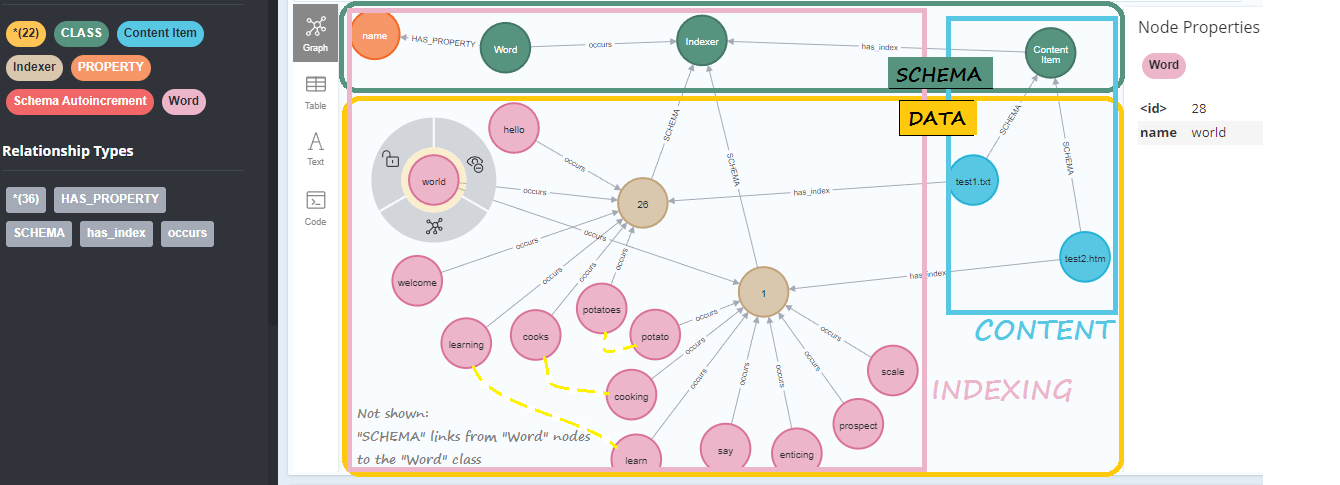
Now, can finally try out some word searches
Using methods provided by the FullTextIndexing class:
FullTextIndexing.search_word("world", all_properties=True)
[{'name': 'test2.htm', 'internal_id': 43294, 'neo4j_labels': ['Content Item']},
 {'name': 'test1.txt', 'internal_id': 43287, 'neo4j_labels': ['Content Item']}]
IMPORTANT: make sure to search for the word STEMS, in order to find all variants!!
For example, search for "potato" in order to find both "potato" and "potatoes".
FullTextIndexing.search_word("POTATO") # Here, we're just returning the internal database ID of the document records
[43287, 43294]
FullTextIndexing.search_word("POTATOES")
[43287]
FullTextIndexing.search_word("Learn")
[43287, 43294]
FullTextIndexing.search_word("Learning")
[43287]
FullTextIndexing.search_word("Supercalifragili")
[]
Note: full-text indexing and search is also available as part of the UI of the web app that is included in the release of Brain Annex.
Currently supported: indexing of text files, HTML files (e.g., formatted notes) and PDF documents.