Let's make a much better world, shall we? What do you say to that enticing prospect?
` # # `Starting on a small scale – we’ll learn cooking a potato well.
` # # --- # Also, change the value of the variable `MY_FOLDER` , below, to the location on your computer where you stored the above folders, # and use your database login credentials. # In[1]: import os import sys import getpass from neoaccess import NeoAccess from brainannex import NeoSchema from brainannex.full_text_indexing import FullTextIndexing from brainannex.media_manager import MediaManager # In case of problems, try a sys.path.append(directory) , where directory is your project's root directory # In[2]: MY_FOLDER = "D:/tmp/tests for tutorials/" # ****** IMPORTANT: CHANGE AS NEEDED on your system; use forward slashes on Windows, too! ****** # In[ ]: # # Connect to the database # #### You can use a free local install of the Neo4j database, or a remote one on a virtual machine under your control, or a hosted solution, or simply the FREE "Sandbox" : [instructions here](https://julianspolymathexplorations.blogspot.com/2023/03/neo4j-sandbox-tutorial-cypher.html) # NOTE: This tutorial is tested on **version 4.4** of the Neo4j database, but will probably also work on the new version 5 (NOT guaranteed, however...) # In[3]: # Save your credentials here - or use the prompts given by the next cell host = "" # EXAMPLES: bolt://123.456.789.012 OR neo4j://localhost # (CAUTION: do NOT include the port number!) password = "" # In[ ]: # In[4]: db = NeoAccess(host=host, credentials=("neo4j", password), debug=False) # Notice the debug option being OFF # In[5]: print("Version of the Neo4j driver: ", db.version()) # In[ ]: # # Explorations of Indexing # In[6]: # CLEAR OUT THE DATABASE #db.empty_dbase() # UNCOMMENT ***************** WARNING: USE WITH CAUTION!!! ************************ # In[7]: # Verify that the database is empty q = "MATCH (n) RETURN COUNT(n) AS number_nodes" db.query(q, single_cell="number_nodes") # #### Initialize the indexing # In[8]: NeoSchema.set_database(db) FullTextIndexing.db = db # In[9]: FullTextIndexing.initialize_schema() # In[ ]: # #### Read in 2 files (stored in the MY_FOLDER location specified above), and index them # In[10]: filename = "test1.txt" # 1st FILE file_contents = MediaManager.get_from_text_file(path=MY_FOLDER, filename=filename) file_contents # In[11]: word_list = FullTextIndexing.extract_unique_good_words(file_contents) word_list # Not shown in any particular order # #### Note that many common words get dropped... # In[12]: internal_id = NeoSchema.create_data_node(class_node="Content Item", properties = {"name": filename}) internal_id # In[13]: # Index the chosen words for this first Content Item FullTextIndexing.new_indexing(internal_id = internal_id, unique_words = word_list) # In[ ]: # #### Process the 2nd Content Item # In[14]: filename = "test2.htm" # 2nd FILE file_contents = MediaManager.get_from_text_file(path=MY_FOLDER, filename=filename) file_contents # In[15]: word_list = FullTextIndexing.extract_unique_good_words(file_contents) word_list # In[16]: internal_id = NeoSchema.create_data_node(class_node="Content Item", properties = {"name": filename}) internal_id # In[17]: # Index the chosen words for this 2nd Content Item FullTextIndexing.new_indexing(internal_id = internal_id, unique_words = word_list) # _Here's what we have created so far (Note: **THE INDEXED WORDS MIGHT VARY, BASED ON THE LATEST LIST OF COMMON WORDS TO DROP**):_ # 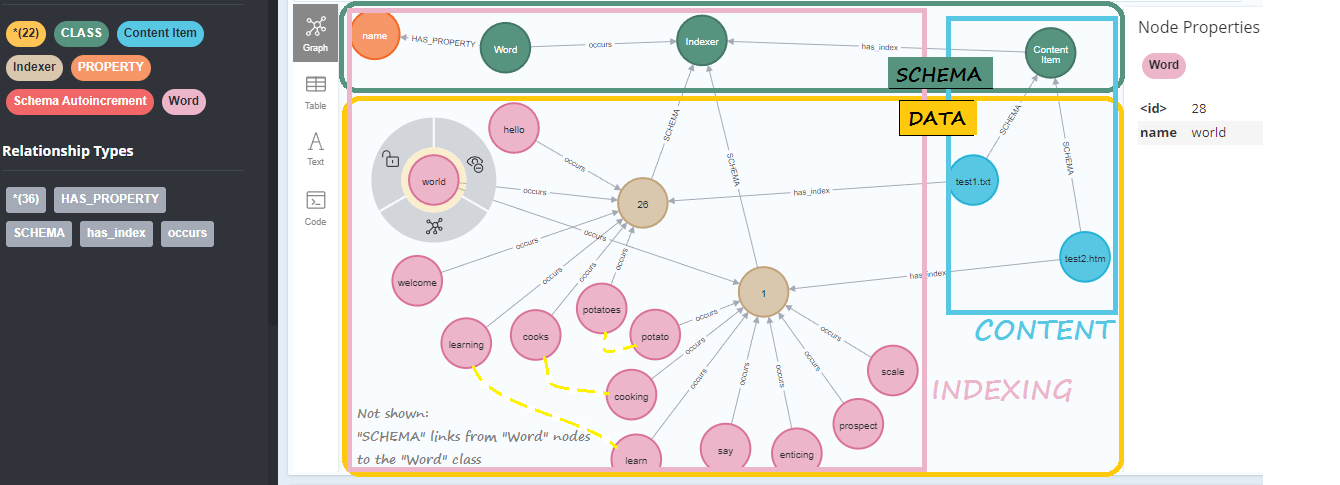 # In[ ]: # In[ ]: # # Now, can finally try out some word searches # #### Using methods provided by the `FullTextIndexing` class: # In[19]: FullTextIndexing.search_word("world", all_properties=True) # In[ ]: # ### IMPORTANT: make sure to search for the word *STEMS*, in order to find all variants!! # For example, search for "potato" in order to find both "potato" and "potatoes". # In[21]: FullTextIndexing.search_word("POTATO") # Here, we're just returning the internal database ID of the document records # In[22]: FullTextIndexing.search_word("POTATOES") # In[23]: FullTextIndexing.search_word("Learn") # In[24]: FullTextIndexing.search_word("Learning") # In[25]: FullTextIndexing.search_word("Supercalifragili") # In[ ]: # ### Note: full-text indexing and search is also available as part of the UI of the web app that is included in the release of Brain Annex. # Currently supported: indexing of text files, HTML files (e.g., formatted notes) and PDF documents. # In[ ]: